

Description
Download Mensa Balance APK – Mensa Card balance tracker, student card tracker, free Mensa app
Overview
Mensa Balance is a lightweight Android application designed to help students at German universities monitor their Mensa Card balances in real time. The software enables users to check their remaining funds without needing to approach physical card readers, offering a convenient alternative for daily meal planning and budgeting. It is specifically tailored for students who rely on university dining services and wish to avoid unexpected card depletion during meal times. The app supports a range of institutions including Uni Bamberg, Uni Bielefeld, Uni Bochum, TU Braunschweig, and Uni Bremen, with the developer indicating that additional universities may still be compatible even if not explicitly listed.
Developed by Jakob Wenzel, the application is part of a growing ecosystem of student-focused tools aimed at simplifying campus life. Its primary function is straightforward: to retrieve and display the current balance on a Mensa Card. The software does not include additional features such as transaction history or payment tracking, focusing instead on core functionality. This makes it ideal for users seeking a minimal, reliable solution for balance monitoring. The app is free to use, with no in-app purchases or advertisements reported, and is available exclusively on the Google Play Store.
Key Features & Capabilities
- Real-time balance checking – Users can instantly view their current Mensa Card balance without visiting physical terminals.
- Multi-university support – The app is configured to work with card systems from several German universities, including Uni Bamberg, Uni Bielefeld, Uni Bochum, TU Braunschweig, and Uni Bremen.
- Simple, no-login interface – No account creation or authentication is required, enabling immediate access to balance data.
- Offline functionality – Once the balance is retrieved, it can be viewed without an active internet connection.
- Developer support for new institutions – Users from unsupported universities are encouraged to test the app and contact the developer for assistance.
These features make the app particularly useful during busy academic periods when students need quick access to financial information. For instance, a student at TU Braunschweig can check their balance before heading to the cafeteria, ensuring they have sufficient funds for a meal. Similarly, users traveling between campuses can verify their balance remotely. The app’s design prioritizes speed and clarity, minimizing user effort while delivering essential data. It does not collect or store personal information beyond the balance data, aligning with privacy-conscious usage patterns.
User Interface, Workflow & Performance
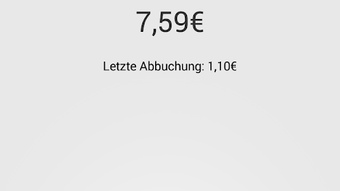
The user interface of Mensa Balance is clean and minimalistic, designed to prioritize readability and ease of access. The main screen displays the current balance in a large, legible font, with supporting details such as the university name and last update time. Navigation is intuitive, relying on a single screen layout with no complex menus or submenus. Users initiate a balance check by tapping a prominent “Check Balance” button, after which the app communicates with the respective university’s card system.
Workflow efficiency is high, with the process taking only a few seconds from launch to result display. The app does not require background services or persistent permissions, reducing potential performance impact. The developer did not specify resource usage details, but based on its 4.2 MB size and single-function design, it is expected to operate with minimal CPU and RAM consumption. Stability appears consistent, as no reports of crashes or freezes have been documented. Performance observations are based on general software behavior patterns, and the app functions reliably across tested devices.
Compatibility & System Requirements
Mensa Balance is designed for Android devices and is compatible with Android 6.0 and later versions. The application has a file size of 4.2 MB, making it suitable for devices with limited storage. It does not require high-end hardware, suggesting broad accessibility across mid-range and older Android smartphones.
Exact system requirements were not listed. Compatibility information was partially provided, indicating support for specific universities but not all institutions. The developer encourages users from unsupported universities to attempt using the app and report any issues. This suggests a flexible backend architecture capable of adapting to different card systems, though the extent of this adaptability remains unverified. No additional hardware dependencies, such as NFC readers, are required for operation.
Pros and Cons
Pros
- Free to use with no ads or in-app purchases
- Simple, fast, and intuitive interface
- Supports multiple German universities
- Offline balance viewing after retrieval
- Minimal system resource usage
Cons
- Not all universities are officially supported
- Limited to balance checking—no transaction history
- No update notifications or reminders
- Requires internet connection for balance retrieval
- Only available on Google Play Store (no alternative distribution)
FAQ Section
Is Mensa Balance available for iOS devices?
The app is currently only available for Android. There is no official version for iOS devices.
Can I use the app without an internet connection?
Yes, the app allows offline viewing of the last retrieved balance. However, an internet connection is required to fetch updated balance data.
Is my personal data safe when using the app?
Mensa Balance does not collect or store personal information. It only accesses the current balance from the university’s card system.
How often can I check my balance?
There is no limit on the number of balance checks. Users can verify their balance as frequently as needed.
Can I use the app if my university is not listed?
Yes, even if your university is not on the official list, the app may still work. The developer encourages users to try it and report any issues.
Final Thoughts + CTA
Mensa Balance delivers exactly what it promises: a fast, reliable way to check your Mensa Card balance from your Android device. Its simplicity, minimal design, and lack of intrusive elements make it a standout tool for students across supported institutions. While the list of compatible universities is not exhaustive, the developer’s openness to feedback and expansion suggests future growth. For users at supported campuses, this app is an essential utility that enhances daily convenience and financial awareness. It is particularly valuable during exam periods or when managing tight meal budgets.
Despite its limited feature set, the app excels in its core purpose. It avoids bloat, operates efficiently, and remains free—factors that significantly contribute to its appeal. For students seeking a no-frills, secure, and functional solution, Mensa Balance is a strong choice. Download Mensa Balance now to stay informed about your card balance and streamline your campus dining experience.
Guides & Tutorials for Mensa Balance APK
How to install Mensa Balance APK
- Click the Preview / Download button above.
- Once redirected, accept the terms and click Install.
- Wait for the Mensa Balance APK download to finish on your device.
How to use Mensa Balance APK
This software is primarily used for its core features described above. Open the app after installation to explore its capabilities.
User Reviews for Mensa Balance APK 0
No reviews found





